Lumina: Scripture & Bible
- 4.7
- Rating
- 100.00K
- Installs
- Free
- Price

 Analysis by App-foxy
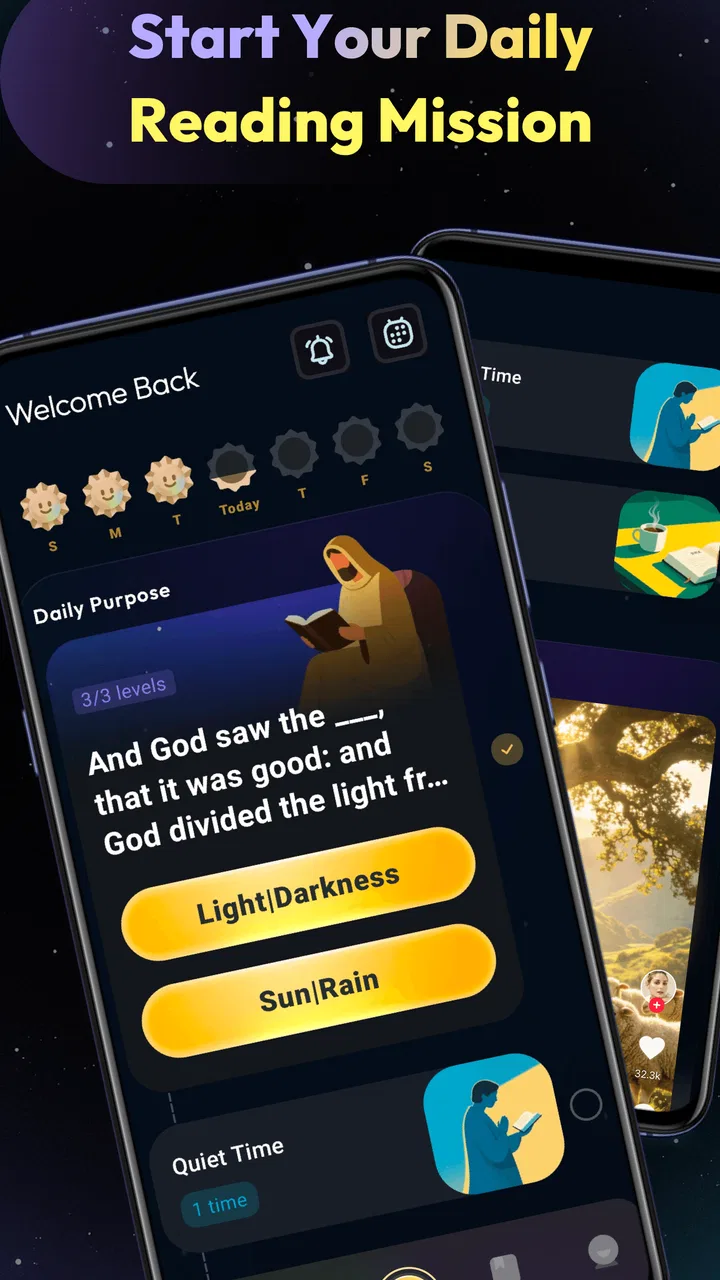
I approached Lumina: Scripture & Bible as a small daily reading companion rather than as a replacement for every Bible tool on my phone. Its promise is simple: help me read, reflect, pray, and build a more regular habit. That simplicity is also the key to deciding whether it belongs in your routine. If you want a calm way to return to Scripture, it is easy to understand. If you need deep study tools, a large reference library, or a highly configurable reading system, you may find its scope too narrow.
Lumina is a free Books & Reference app from WiseWakeTech, aimed at everyone rather than a specialist audience. It has reached over 100 thousand installs and holds a 4.6 average from around 1.4 thousand ratings, which suggests that its straightforward approach is connecting with a meaningful group of readers. I would treat those figures as a sign of encouraging reception, not as proof that it will suit every reading style.
How I Would Decide Whether Lumina Fits My Routine
Before making Lumina part of my day, I’d give it a short trial tied to one routine I already have, such as a lunch break or winding down at night. I’d pay attention not just to whether I open it, but whether its focused reading-and-reflection approach leaves me wanting to return without turning the habit into another obligation. That gives me a practical basis for judging its staying power.
You May Also Like

 Blood Strike: 2.5 Anniversary
Blood Strike’s Loadouts Turn Every Drop Into a Tactical Gamble
A close look at Blood Strike’s custom loadouts: how fast access to signature weapons reshapes its battle royale rhythm, rewards preparation, and narrows the gap between fights.

 Pandora - Music & Podcasts
Pandora’s Music Is Easy to Start, but Harder to Recover
Pandora’s strength is its low-effort path from a seed to a station. Its weak spot is how much confidence it asks you to place in connection, setup, and quiet recovery.

 8 Ball Pool
 Is Built on Rivalries, Rematches, and Routine
A close look at the rivalries, rematches, shared routines, and unanswered safety questions that turn a quick pool match into a persistent mobile community.

 Samsung Music
’s Quiet Strength Is Playing What You Already Own
Its reach comes less from spectacle than from dependable access to a personal library. That simplicity is both the app’s strongest retention engine and its ceiling.

 AccuWeather: Weather Radar
AccuWeather Review: A Quick, Clear Forecast for Everyday Decisions
For everyday plans, the best forecast is the one you can understand quickly. AccuWeather makes rain timing, radar, and local conditions easy to act on, with a few trade-offs.

 Hill Climb Racing
Why Hill Climb Racing Still Turns Crashes Into One More Run
A tiny car, a bumpy hill and one more upgrade: Hill Climb Racing keeps resurfacing because its simple chaos makes every near-miss feel personal.
More From Our News Desk



Start with the habit you actually want to build
The first question is not whether Lumina can replace a printed Bible, a study app, or a prayer journal. The better question is what usually prevents you from opening one. For me, the main obstacle is often friction: too many choices, too much browsing, or the feeling that a short reading session is not worthwhile. An app centered on Scripture and reflection can be useful precisely because it gives that moment a clear purpose.
I would recommend judging it by three practical criteria. First, can you open it when you have only a few quiet minutes? Second, does the presentation encourage thought rather than passive scrolling? Third, does it help you return tomorrow without making the routine feel like another task to manage? Those questions matter more than a long feature list for someone seeking a personal devotional rhythm.
A realistic use case is a commute, a lunch break, or the few minutes before sleep. I can imagine opening Lumina after putting my phone on a quieter setting, reading a passage, and spending a moment considering one idea instead of jumping immediately into another app. That workflow is modest, but modesty is a strength when the goal is consistency. A complicated tool can be more capable and still be less useful if I avoid opening it.
Think about reading depth before choosing
Not every Bible reader wants the same experience. Some people want a focused devotional pause. Others want parallel translations, original-language references, extensive cross-references, maps, commentaries, highlighting systems, and exportable notes. Lumina makes more sense for the first group. Its identity is closer to a guided reading companion than to a complete academic study desk.
That distinction should shape your expectations. If you are preparing a lesson, comparing wording across translations, or tracing a theme through many books, a dedicated study Bible app may be the better starting point. If you are trying to make Scripture part of an ordinary day, a less crowded interface can be more inviting. I see Lumina as a tool for returning to the text, not as a universal answer to every question that may arise from it.
Check the practical basics
The app is free, carries an Everyone content rating, and supports devices running Android 8.0 or later. Those details make it approachable for many users, especially someone who does not want to commit money before understanding whether a devotional app fits. The current version is 1.0.6, so I would keep expectations realistic about maturity: the experience may feel focused and uncluttered, but it is not wise to assume that a newer app has the depth accumulated by long-established reference platforms.
Lumina was released on January 9, 2026, and that timing matters when comparing it with alternatives. A newer product can feel fresh and focused, but established apps often have years of refinement behind their search, synchronization, accessibility, and study workflows. I would choose Lumina for its intended daily experience, not simply because it is new.
Where Lumina feels strongest
The clearest advantage is focus. The app is built around a short chain of actions: read Scripture, reflect on it, pray, and grow through repetition. That sequence gives the session an emotional shape. Instead of treating the Bible as a database to search, it encourages me to approach it as something to sit with. For a reader who tends to open a study app and then get lost in menus, that narrower purpose can be genuinely helpful.
I also like the way this kind of app can lower the threshold for beginning. A person does not need to plan a full study session to benefit from a few attentive minutes. That makes Lumina suitable for someone restarting a faith routine after a long gap, a reader who wants a gentle morning practice, or a household member looking for a personal moment of reflection without carrying a physical book everywhere.
The real strength is not doing everything; it is making one meaningful action easier to repeat. That is an important difference from feature-heavy Bible platforms. Lumina can be valuable when the problem is not access to Scripture but the difficulty of creating a dependable pause in a busy day.
Three ways I would use it beyond simply opening and reading
My first practical tip would be to connect the app to an existing daily anchor. Rather than waiting for an ideal quiet morning, I would place the reading immediately after something that already happens, such as making coffee or finishing a commute. The app then becomes part of a sequence instead of a separate promise I have to remember. This is especially useful for people who download devotional apps enthusiastically but stop using them once the initial motivation fades.
My second tip would be to keep the reflection narrow. After reading, I would choose one sentence, image, or question that stayed with me and carry that into the day. Trying to summarize an entire passage can turn reflection into homework. A focused response is more realistic and makes it easier to notice whether the app is helping me engage or merely helping me consume another screen of text.
My third tip is to use Lumina as a doorway rather than a complete study plan. If a passage raises a difficult question, I would note the question and return later with a trusted commentary, printed study Bible, or discussion with another person. This avoids asking a devotional app to perform a role it was not designed to fill. In my experience, that division of labor is healthier: Lumina supports the habit, while deeper resources handle investigation and context.
Small limitations that affect everyday use
The same focus that makes Lumina approachable may feel restrictive after the first enthusiasm wears off. Readers who want to customize every part of a plan may wish for more control than a streamlined devotional experience normally provides. People who already have a carefully organized system for notes and study may also find that switching to a simpler app creates more separation between reading and research.
There is another subtle limitation: reflection depends on the reader’s willingness to slow down. No app can manufacture attention. If you open Lumina while rushing between notifications, the spiritual purpose can become another brief piece of content. I would therefore avoid judging it only by how quickly I can complete a session. Its value appears when I allow the reading and prayerful response to take priority over speed.
Some users may also prefer the tactile memory of a printed Bible. Paper makes it easy to remember where a passage sits on a page, write in a margin, and keep the phone out of the experience. Lumina is more convenient when traveling or when a physical book is not nearby, but convenience and concentration are not always the same thing. For me, the best choice would depend on the setting rather than on a permanent decision between paper and screen.
How it compares with the usual alternatives
Compared with a printed Bible, Lumina wins on portability and the ability to fit naturally into a phone-based routine. The printed book wins on physical presence, fewer digital distractions, and the feeling of seeing a passage in a stable, familiar place. I would choose the app for travel, short breaks, and habit-building, while keeping paper for longer, slower reading.
Compared with a general Bible reader, Lumina appears better suited to a devotional mindset than to broad research. A general reader is normally the stronger choice when search, comparison, and reference work are central. Lumina is the more appealing option when those tools tend to pull me away from the purpose of the session. The trade-off is clear: less breadth can produce more concentration.
Compared with a prayer journal, Lumina offers a more guided digital starting point, while a journal gives unlimited room for personal language, questions, and long-term memories. I would not see them as competitors. A useful routine could begin in Lumina with reading and reflection, then move to a notebook when a thought deserves more space. That combination prevents the app from carrying the entire burden of personal growth.
Compared with a church study group or a trusted mentor, any app is limited in conversation and accountability. Lumina can help me arrive prepared, but it cannot replace the insight that comes from discussing a difficult passage with other people. If community is the part of your routine that is missing, downloading another reading tool may not solve the real problem.
What switching to Lumina actually involves
The cost of switching is low in money because the app is free, but time and attention are still costs. Moving from a printed Bible means adapting to reading on a screen. Moving from a feature-rich app means accepting a more focused workflow. Moving from a personal journal means deciding which thoughts belong inside a digital routine and which deserve a separate place.
I would make the change gradually instead of abandoning every existing resource. Keep your usual Bible or study tool available, and use Lumina for a defined purpose, such as a short morning reading or an evening reflection. After a week or two, ask whether you are opening Scripture more consistently, remembering what you read, and feeling less overwhelmed by the process. Those are better measures than the number of sessions completed.
Because the app is from WiseWakeTech and is still at version 1.0.6, I would also keep my workflow simple at first. Avoid building an elaborate system around it until you know how well it fits your day. A lightweight routine is easier to preserve if the app changes over time, and it reduces disappointment if you eventually decide that a traditional study platform serves you better.
Who should choose it, and who should skip it
I think Lumina is a good match for beginners, returning readers, and anyone who wants a calmer devotional Bible app rather than a research-heavy library. It is also a sensible choice for people who value a free starting point and want to test a regular Scripture habit without making a financial commitment. The Everyone rating makes it approachable for a broad household audience, although each person will still bring different expectations to the experience.
I would skip it if your main reason for installing a Bible app is advanced study. Students, teachers, and serious researchers may be happier with a platform designed around extensive references and comparison. I would also skip it if you know that reading on a phone consistently leads you into unrelated distractions. In that case, a printed Bible, a dedicated e-reader, or a scheduled group may be a better answer than another mobile application.
It is also not the right choice for someone who expects an app to create spiritual discipline automatically. Lumina can make the first step easier, but the habit still depends on when you open it and how attentively you read. That is not a flaw unique to this product; it is simply the boundary between a useful aid and a personal practice.
My recommendation after using it
I would recommend Lumina to a friend who says, “I want to read Scripture more regularly, but I need a simple place to begin.” Its free access, clear devotional purpose, and approachable presentation make it a reasonable first choice for that situation. I would describe it as a focused companion for reading and reflection, not as the only Bible resource a person will ever need.
My strongest recommendation is to try it with a specific routine rather than downloading it without a plan. Choose one dependable moment, keep the session short enough to repeat, and write down one question or insight when something deserves further thought. That approach reveals the app’s real value quickly: whether it helps you return with attention instead of merely adding another icon to your phone.
In the end, Lumina succeeds when I use it for what it is designed to encourage. It gives a reader a direct path from Scripture toward reflection and prayer, and that can be more useful than a crowded collection of tools. It is less convincing for deep research, extensive personal archiving, or readers who strongly prefer paper. For anyone seeking a gentle, free entry into a more regular reading habit, however, I think it is worth making room for.
FAQs for Lumina: Scripture & Bible
01What platforms is Lumina: Scripture & Bible available on?
Lumina: Scripture & Bible is available for both Android and iOS devices. Users can download it from the Google Play Store or the Apple App Store. The app is designed to be user-friendly on both smartphones and tablets, providing seamless access to its features across different devices.
02Does Lumina: Scripture & Bible require an internet connection?
While an internet connection is required for downloading the app and accessing certain features like online commentaries and community forums, Lumina: Scripture & Bible also offers offline access to basic scripture texts. This ensures that users can read and study the Bible without needing constant internet access.
03Are there any in-app purchases in Lumina: Scripture & Bible?
Lumina: Scripture & Bible offers a free version with essential features. However, there are optional in-app purchases available, such as premium commentaries, ad removal, and additional study tools. These purchases enhance the app experience but are not mandatory for basic use.
04How user-friendly is the interface of Lumina: Scripture & Bible?
The app is designed with a clean and intuitive interface, making navigation simple for users of all ages. It features easy-to-use search functions, bookmarks, and note-taking capabilities. The layout is tailored to enhance the readability of scripture texts, ensuring a pleasant user experience.
05Can I customize my reading experience in Lumina: Scripture & Bible?
Yes, Lumina: Scripture & Bible allows users to customize their reading experience. You can adjust font sizes, switch between different themes for better visibility, and select from various translation options. This customization ensures that users can tailor their experience to suit their personal preferences.
Pros
- User-friendly interface for quick navigation.
- Comprehensive search feature for verses.
- Customizable reading plans and reminders.
- Offline access to saved scriptures.
- Audio Bible options enhance accessibility.
Cons
- In-app purchases can be pricey.
- Limited translations in free version.
- Requires registration for full features.
- Occasional ads disrupt reading experience.
- Initial setup can be slightly cumbersome.

Lumina: Scripture & Bible
Gallery